Applies to M9484C only.
Requires Option NLC.
Provides nonlinear correction that does not require calibration (Cal) for waveform, power, or frequency, but requires prior model extraction to characterize system behavior, and dynamically applies correction coefficients in real time when power, frequency, or waveform is changed. For each frequency, there is a specific maximum power range where optimal performance is maintained. If the input power exceeds the maximum allowable range for a given frequency, the signal quality may be degraded due to reduced effectiveness of the nonlinear correction. Even in the low-power region, where the PA exhibits linear behavior, EVM may still be degraded.
This topic provides user-interface and SCPI descriptions for Real-Time Instrument Nonlinear Correction.
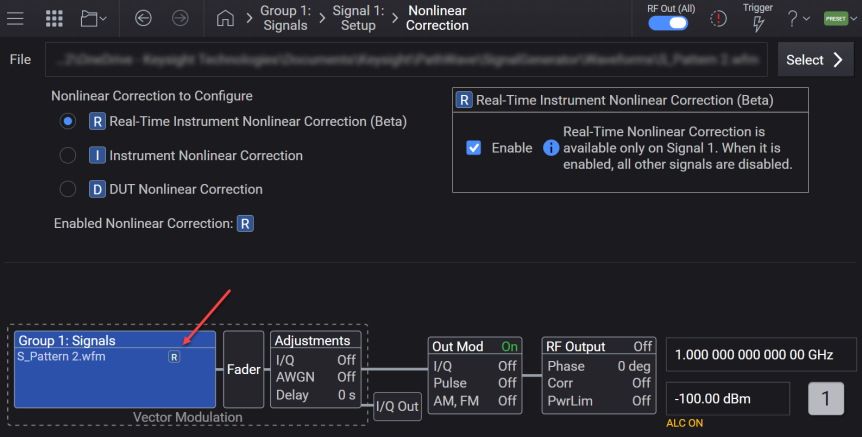
When Real-Time Instrument Nonlinear Correction is enabled, an icon appears in the Signal block, as shown below.
Enables and disables Real-Time Instrument Nonlinear Correction.
|
GUI Location |
Signals > Mode set to Waveform File > Nonlinear Correction > Configure > Real-Time Instrument Nonlinear Correction > Enable |
|
SCPI Command |
[:SOURce]:GROup<group>:SIGNal<signal>:NCORrection:INSTrument:RTIMe[:STATe] ON|OFF|1|0 [:SOURce]:GROup<group>:SIGNal<signal>:NCORrection:INSTrument:RTIMe[:STATe]? |
|
SCPI Example |
:GRO:SIGN:NCOR:INST:RTIM ON :GRO:SIGN:NCOR:INST:RTIM? |
| Dependencies |
|
|
Couplings |
Only the first signal in a specified group can be enabled at a time. If another signal in the specified group is set to ON, this setting is set to OFF. This setting, Enable Instrument Nonlinear Correction, and Enable DUT Nonlinear Corrections settings are mutually exclusive. When one is turned ON, the other is turned OFF. |
|
Preset |
OFF |
|
State Saved |
Yes |
|
Initial S/W Revision |
A.19.01 |